
 Popular Content
Filed Under Delphi
Open Source Delphi
visits: 6412 | score: 3.2
posted by sysrpl on Saturday May 1, 2004 12:00 AM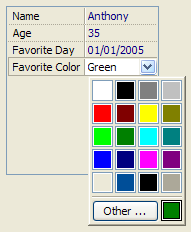 Welcome to the codebot Delphi page. Here you'll find the latested updates on our Delphi articles, demos, and source code. If you want to help by submitting some document or have a demonstration you'd like to share, please leave us a note.
From our about page:
We provide articles of a technical nature to discuss and promote open technologies. We also review software and developer techniques and allow people to voice their opinions on subjects important to the developer community.
The bare controls library was an attempt to be a lightweight set of units that use no other runtime units. This means no Forms, Controls, Classes, SysUtils, or ComObj support. The idea was to create a cross platform, cross pascal compiler set of units that provided the programmer with the basic functionality to draw on the screen and accept user input. At one point, I actually got it working to create and draw to an OpenGL window on both Windows and Linux.
The codebot controls library has lots of useful routines, classes, and components for programming on Windows. There is a lot more to it than just the components you'll see on the pallet. Even if you don't use Delphi, I think there is still plenty pick through . Perhaps you can port some of the code to other tools.
For backgrounder information on working with the shell controls you can read this article and try this demo.
To learn more about the auto completion, check out this article. The component simplifies auto completion greatly.
Codebot Controls Overview
 TAutoCompletion
A non-visual component that associates system or user defined completion lists with other controls that accept test input. When active, the associate text control will display the assigned completion items as you type.

 TBalloonHint
A non-visual component that displays a ballon hint with an icon, caption, and text. The balloon callout can be assigned four different directions, and it comes with a balloon hint editor.

 TButtonEdit
An edit control with an optional attached button, and optional icon placed before the text entry portion of the control. Comes with a set of predefined glyphs, and the ability to define your own.
 TCaptionBox
A container control that has a caption bar and a close button. It can be set to automatically hide when closed, or to stick itself when clicked.
 TCheckListEdit
A combo box type control that allows the user to check off items. Automatically displays checked off items as a comma separated list, and has and optional status bar.
 TColorGridbutton
A popup button derived control that simulates the system defined color chooser button from the display control panel applet.
 TDatePopupEdit
An edit control for entering date values. It can parse typed dates and has an attached calendar.
 TDBDrawList
A data bound list control that allows the programmer good control of custom drawing items from database records.
 TDBReportView
A data bound list control that displays database records in a list view format with some optional custom drawing abilities.
 TDrawList
A list control that contains no data allowing the programmer to define his own storage and presentation.
 TExpandableBox
A container control that emulates a group box, but with a node button allowing the user to expand or collapse the container.
 TFolderView
A two level list control that groups items into folders, and folder items. Users can click on folders to expand them, and click on folder items to take some programmer defined action.
 TImageButton
A button control that can display an image with text with an optional drop down menu glyph. The image can be postioned left or right of the text.
 TImageListEdit
A combo box type control that ties to any image list. Will display list items as images without writing any code.
 TInspector
A property editor control that allows the user to edit from a list. Each editable item has it's own type editor that validates input automatically. Comes with a few predefined editors that show you how to easily define your own. Editors can custom draw themselves, accept text, drown down controls, or editor dialog controls.

 TLargeShellImages
A non-visual component that gives you access to the system defined set of large shell images.
 TListEdit
An edit control that displays a drop down list of items. Differs from a list box in that you can display an icon along side your text entry area, and you can choose from a set of images or define your own to appear on top of the drop down button.

 TPaneControl
A container control that allow the programmer to create pane sheets. Pane sheets can be hidden, closed, or reordered.


 TShellEdit
An edit control that allows the user to navigate the shell namespace. Can auto complete for you as you type, and display a drop down shell tree.


 TSlideBar
A windowed slider control that can be postioned horizontally or vertically. Increments are in floating point values.
 TSmallShellImages
A non-visual component that gives you access to the system defined set of small shell images.
 TThemeGlyphButton
A graphic control that simulates a variety of themed button styles. Reptoduces non-themed versions of the button styles when themes are deactivated.
Downloads of the Codebot Controls have been removed. If you're interested in the project visit this site instead.